🖥 Chart Board and Coin List
This is the main screener workspace.
It displays charts of selected coins and the list of all available market instruments.
The board allows you to analyze multiple coins at the same time and switch between them quickly without opening extra tabs.
📊 Chart Board
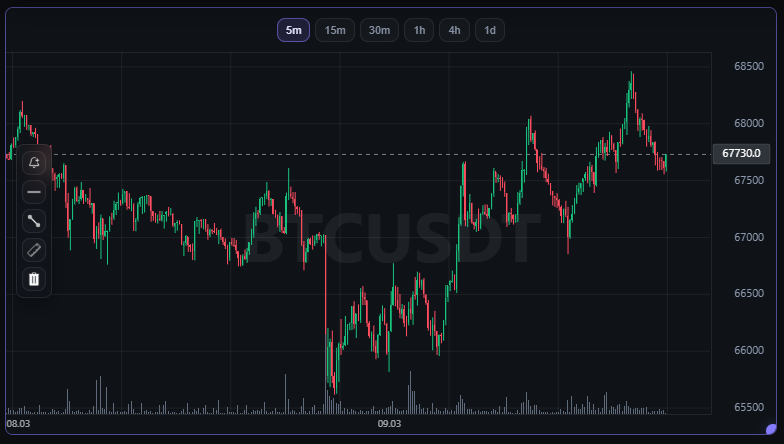
The chart board is the central area of the interface where charts of selected coins are displayed.
Each chart shows price movement and provides tools for technical analysis.
⏱ Available timeframes
- 5m
- 15m
- 30m
- 1h
- 4h
- 1d
Switching the timeframe refreshes the chart data and allows you to analyze the market across different time intervals.
🧩 Chart Layout
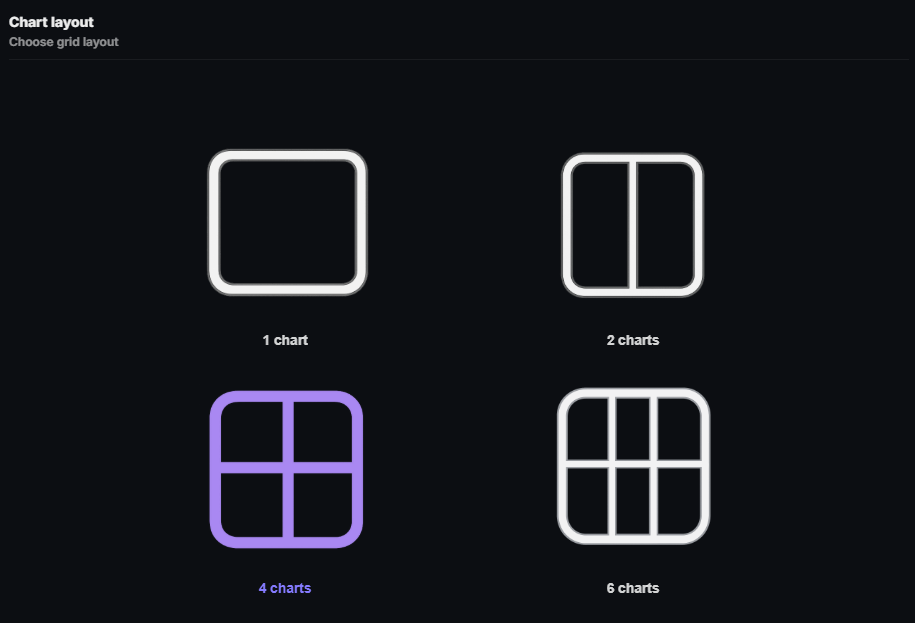
The number of charts on the board can be customized.
This allows you to analyze multiple coins at the same time and compare their dynamics.
🗂 Available layout options
- 1 chart
- 2 charts
- 4 charts
- 6 charts
Settings → Grid
🛠 Chart Tools
Each chart includes analysis tools.

⚙️ Main tools
🔔 Price Alert
Allows you to set a price level.
When price reaches the selected value, the system sends a notification.
📏 Horizontal Level
Used to mark support and resistance levels.
📈 Line
Allows you to draw sloping trend lines.
📐 Ruler
A tool for measuring price movement between two points.
It shows:
- price change
- percentage movement
❌ Delete
Removes chart markup elements.
📋 Coin List
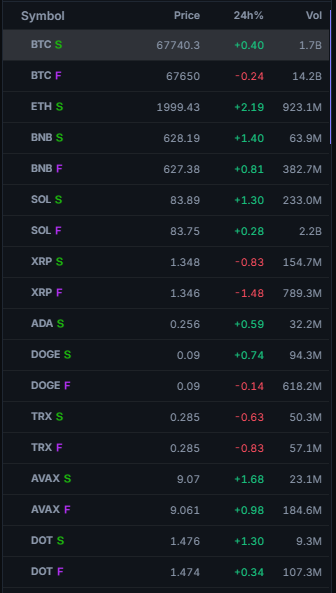
The coin list is located in the right-side panel.
It contains all coins from the selected exchange and is used for quick instrument selection.
For each coin, the following is displayed:
- ticker
- current price
- 24h price change
- trading volume
The list updates automatically and reflects the current market state.
🏦 Exchange Switch
At the top of the coin list there is an exchange switch.
Supported exchanges:
- Binance
- Bybit
When switching the exchange, the coin list automatically refreshes and displays data from the selected venue.

🔍 Coin Search
Above the coin list there is a search field.
It allows you to quickly find a coin by its ticker.
🧪 Search examples
BTC
ETH
SOL
As you type, the list is filtered automatically.

🔖 Favorites
Any coin can be added to favorites.
To do this, click the 🔖 icon next to the ticker.
This makes it easier to save and quickly find frequently used instruments.